



SelengkapNya ^_^
Expanding on yesterday’s BGP Peering configuration. Today we enable basic BGP prefix filtering.
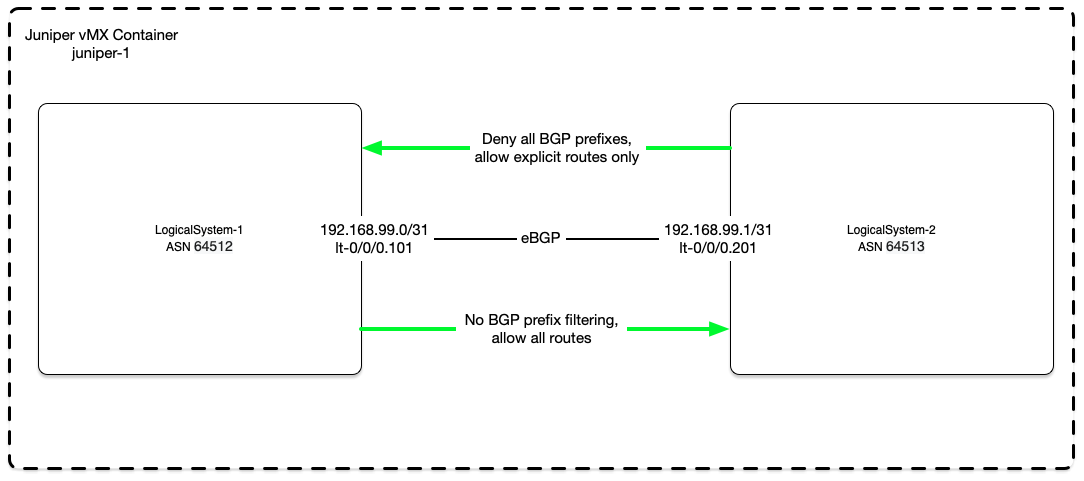
Exchanging routes on the Internet through BGP requires a fair bit of trust in the downstream organization to only send routes they are authoritative for. Without proper filtering, anyone could announce Googles 8.8.8.0/24 route and potentially redirect this critical DNS traffic back to a rogue location.
For a service provider, it is critical to deny all inbound prefixes and only allow those which are properly authorized to do so. Proper LoAs and routing registries are necessary to validate subnet ownerships.
Once ownership is confirmed, proper filtering needs to take place. Below is a basic BGP filter configuration to deny all prefixes and only allow subnets properly authorized by the BGP neighbor.
Details
Imported routes before BGP prefix filtering:
jemurray@juniper-1# run show route receive-protocol bgp 192.168.99.1 logical-system LogicalSystem-1

inet.0: 14 destinations, 14 routes (14 active, 0 holddown, 0 hidden)
  Prefix		  Nexthop	       MED     Lclpref    AS path
* 10.200.0.0/16           192.168.99.1                            64513 I
* 10.201.0.0/16           192.168.99.1                            64513 I
* 10.202.0.0/16           192.168.99.1                            64513 I
* 10.203.0.0/16           192.168.99.1                            64513 I
* 10.204.0.0/16           192.168.99.1                            64513 I
* 10.205.0.0/16           192.168.99.1                            64513 I

inet6.0: 1 destinations, 1 routes (1 active, 0 holddown, 0 hidden)
The filter configuration which is built off of yesterday’s basic BGP lab:
# Apply the import filter to a specific BGP neighbor
set logical-systems LogicalSystem-1 protocols bgp group remote-peers-group-b neighbor 192.168.99.1 import import-prefixes_192.168.99.1

# Create a prefix list of allowed routes to be imported
set logical-systems LogicalSystem-1 policy-options prefix-list import-prefixes_192.168.99.1 10.200.0.0/16
set logical-systems LogicalSystem-1 policy-options prefix-list import-prefixes_192.168.99.1 10.201.0.0/16

# Deny all routes by default, then allow prefixes from the prefix list
set logical-systems LogicalSystem-1 policy-options policy-statement import-prefixes_192.168.99.1 term 1 from protocol bgp
set logical-systems LogicalSystem-1 policy-options policy-statement import-prefixes_192.168.99.1 term 1 from prefix-list import-prefixes_192.168.99.1
set logical-systems LogicalSystem-1 policy-options policy-statement import-prefixes_192.168.99.1 term 1 then accept
# The default reject (this is very important)
set logical-systems LogicalSystem-1 policy-options policy-statement import-prefixes_192.168.99.1 term 2 then reject
Configuration diff from yesterday’s lab:
jemurray@juniper-1# show | compare
[edit logical-systems LogicalSystem-1 protocols bgp group remote-peers-group-b neighbor 192.168.99.1]
+      import import-prefixes_192.168.99.1;
[edit logical-systems LogicalSystem-1 policy-options]
     prefix-list local-prefixes { ... }
+    prefix-list import-prefixes_192.168.99.1 {
+        10.200.0.0/16;
+        10.201.0.0/16;
+    }
[edit logical-systems LogicalSystem-1 policy-options]
+    policy-statement import-prefixes_192.168.99.1 {
+        term 1 {
+            from {
+                protocol bgp;
+                prefix-list import-prefixes_192.168.99.1;
+            }
+            then accept;
+        }
+        term 2 {
+            then reject;
+        }
+    }
Imported routes after the filter. In this example LogicalSystem-2 is sending many more routes then received:
jemurray@juniper-1# run show route receive-protocol bgp 192.168.99.1 logical-system LogicalSystem-1

inet.0: 14 destinations, 14 routes (10 active, 0 holddown, 4 hidden)
  Prefix		  Nexthop	       MED     Lclpref    AS path
* 10.200.0.0/16           192.168.99.1                            64513 I
* 10.201.0.0/16           192.168.99.1                            64513 I

inet6.0: 1 destinations, 1 routes (1 active, 0 holddown, 0 hidden)
We can verify there are more routes being sent then allowed through the filters. If your downstream customers are sending rogue routes, it may be worth having a conversation with them. It could be a misconfiguration or possibly nefarious intent.
jemurray@juniper-1> show route receive-protocol bgp 192.168.99.1 hidden logical-system LogicalSystem-1

inet.0: 14 destinations, 14 routes (10 active, 0 holddown, 4 hidden)
  Prefix		  Nexthop	       MED     Lclpref    AS path
  10.202.0.0/16           192.168.99.1                            64513 I
  10.203.0.0/16           192.168.99.1                            64513 I
  10.204.0.0/16           192.168.99.1                            64513 I
  10.205.0.0/16           192.168.99.1                            64513 I
Appendix
Full router configuration:
jemurray@juniper-1> show configuration | except encrypted-password
## Last commit: 2020-10-06 10:38:02 UTC by jemurray
version 20190829.221548_builder.r1052644;
system {
    host-name juniper-1;
    root-authentication {
    }
    login {
        user jemurray {
            uid 2000;
            class super-user;
            authentication {
            }
        }
    }
    services {
        ssh;
    }
    syslog {
        user * {
            any emergency;
        }
        file messages {
            any notice;
            authorization info;
        }
        file interactive-commands {
            interactive-commands any;
        }
    }
    processes {
        dhcp-service {
            traceoptions {
                file dhcp_logfile size 10m;
                level all;
                flag packet;
            }
        }
    }
}
logical-systems {
    LogicalSystem-1 {
        interfaces {
            lt-0/0/0 {
                unit 101 {
                    description "LogicalSystem-2 P2P Interface";
                    encapsulation ethernet;
                    peer-unit 201;
                    family inet {
                        address 192.168.99.0/31;
                    }
                }
            }
        }
        protocols {
            bgp {
                group remote-peers-group-b {
                    type external;
                    export export-local-prefixes;
                    neighbor 192.168.99.1 {
                        import import-prefixes_192.168.99.1;
                        peer-as 64513;
                    }
                }
            }
        }
        policy-options {
            prefix-list local-prefixes {
                10.100.0.0/16;
                10.101.0.0/16;
                10.102.0.0/16;
                10.103.0.0/16;
                10.104.0.0/16;
                10.105.0.0/16;
            }
            prefix-list import-prefixes_192.168.99.1 {
                10.200.0.0/16;
                10.201.0.0/16;
            }
            policy-statement export-local-prefixes {
                term 1 {
                    from {
                        prefix-list local-prefixes;
                    }
                    then accept;
                }
            }
            policy-statement import-prefixes_192.168.99.1 {
                term 1 {
                    from {
                        protocol bgp;
                        prefix-list import-prefixes_192.168.99.1;
                    }
                    then accept;
                }
                term 2 {
                    then reject;
                }
            }
        }
        routing-options {
            static {
                route 10.100.0.0/16 discard;
                route 10.101.0.0/16 discard;
                route 10.102.0.0/16 discard;
                route 10.103.0.0/16 discard;
                route 10.104.0.0/16 discard;
                route 10.105.0.0/16 discard;
            }
            autonomous-system 64512;
        }
    }
    LogicalSystem-2 {
        interfaces {
            lt-0/0/0 {
                unit 201 {
                    description "LogicalSystem-1 P2P Interface";
                    encapsulation ethernet;
                    peer-unit 101;
                    family inet {
                        address 192.168.99.1/31;
                    }
                }
            }
        }
        protocols {
            bgp {
                group remote-peers-group-a {
                    type external;
                    export export-local-prefixes;
                    neighbor 192.168.99.0 {
                        peer-as 64512;
                    }
                }
            }
        }
        policy-options {
            prefix-list local-prefixes {
                10.200.0.0/16;
                10.201.0.0/16;
                10.202.0.0/16;
                10.203.0.0/16;
                10.204.0.0/16;
                10.205.0.0/16;
            }
            policy-statement export-local-prefixes {
                term 1 {
                    from {
                        prefix-list local-prefixes;
                    }
                    then accept;
                }
            }
        }
        routing-options {
            static {
                route 10.200.0.0/16 discard;
                route 10.201.0.0/16 discard;
                route 10.202.0.0/16 discard;
                route 10.203.0.0/16 discard;
                route 10.204.0.0/16 discard;
                route 10.205.0.0/16 discard;
            }
            autonomous-system 64513;
        }
    }
}
chassis {
    fpc 0 {
        pic 0 {
            tunnel-services {
                bandwidth 10g;
            }
        }
    }
}
interfaces {
    ge-0/0/1 {
        unit 0 {
            family inet {
                dhcp;
            }
        }
    }
    fxp0 {
        unit 0 {
            family inet {
                dhcp {
                    vendor-id Juniper-vmx-VM5F52E462F8;
                }
            }
        }
    }
}
0 Reviews